 twobucket.

A good detailing invoice has your business name and contact details, an invoice number and date, the customer’s name and their vehicle, each service and add-on on its own line with its price, any discount, sales tax where your state charges it, a deposit already paid, the amount due, when it’s due, and how to pay. That answers the questions customers usually ask and gives you a clean record for your books.
This guide walks through each part, explains why the vehicle belongs on the invoice, covers sales tax with real state examples, shows how to handle a deposit, and includes a layout you can copy and fill in. At the end, we explain how TwoBucket puts an invoice together for you. If the job hasn’t been quoted yet, start with how to write and send a detailing quote.
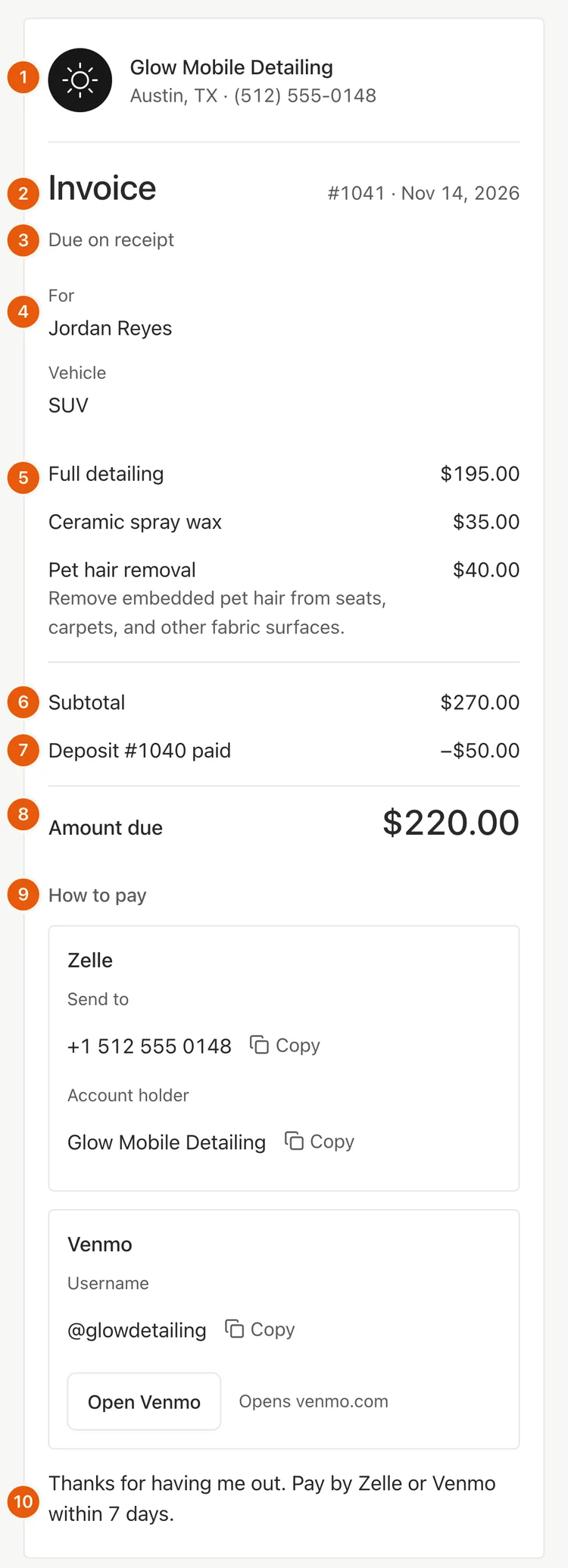
What every detailing invoice needs
- Your business. Your business name, phone number, and city. Add your logo if you have one. This tells the customer who the invoice is from and how to reach you.
- Invoice number and date. Give every invoice a different number so you can find it later and match a payment to it. Numbering them in order is a common habit, and it makes searching easier.
- When it’s due. State the due date clearly: on receipt, or in 7, 15, or 30 days.
- The customer and their vehicle. The customer’s name and the vehicle you worked on: at least the type, or the make, model, and year. More on why the vehicle matters below.
- One line per service and add-on. List each service (such as an interior detail or a paint correction) and each add-on (such as pet hair removal or an engine bay cleaning) on its own line with its price. The customer sees exactly what they are paying for and asks fewer questions.
- Subtotal, discount, and sales tax. Show the subtotal of all lines. If you gave a discount, show it next. Then add sales tax where your state requires it.
- Deposit paid. If the customer already paid a deposit, show it as its own line with its reference number. This way the amount due reflects only what is left.
- Amount due. The final number the customer owes, after the deposit and any discount.
- How to pay. List every way you accept payment and include the details the customer needs: a Zelle phone number, a Venmo username, a card payment link, or simply “cash.”
- A short note. A line of thanks and a reminder of when to pay. Keep it brief.
Why put the vehicle on the invoice?
Vehicle size changes the price for most detailers. In our study of 30 mobile detailers, 23 priced by vehicle size (what 30 mobile detailers charge). Putting the vehicle on the invoice shows the customer why the price is what it is. A sedan and a three-row SUV are different jobs at different prices, and the invoice should reflect that.
It also helps when the customer books again. You can pull up their last invoice, see exactly what vehicle you worked on and what you charged, and pick up where you left off.
Do you charge sales tax on car detailing?
It depends on the state and the service. There is no single national rule.
New York says car wash services are taxable when the car wash’s staff wash, wax or vacuum the car, and that detailing services are generally taxable. Washington lists car wash and detailing among services subject to sales tax. Connecticut lists car wash services as taxable, though its page does not name detailing separately. In Florida, a 2023 ruling for one business called car wash services that add wax or another protective coating taxable. That ruling binds only the business that asked for it, but it shows how the state reads the law.
Whatever your state’s rule, keep your invoices. The IRS says supporting documents include invoices and receipts, and that these documents contain the information you need to record in your books.
Check with your state’s revenue department or a tax professional for the rules that apply to you.
How do you show a deposit on an invoice?
Give the deposit its own line, with its reference number, after the subtotal. Something like “Deposit #1040 paid −$50.00.” The amount due then shows only what is left. The customer can see what they already paid and what they still owe in one place. For more on collecting deposits, see the deposits guide.
A detailing invoice you can copy
Here is a layout you can use for any detailing job.
Fill in each section with the details of the job, swap in your own business name and payment methods, and adjust the services to match the work you did.
When should you send the invoice?
Send the invoice while you are still at the car, or while you finish the last panel. The customer can look at it and pay before you leave. If you drive away and send it later, you add a step for both of you, and the payment sits in someone’s inbox instead of in your account.
Detailing invoices in TwoBucket
The invoice starts from the customer’s request or the approved quote, with the services they picked already on it. A service with a starting price asks you to set the final price. You can add items from your saved services and add-ons, such as pet hair removal, or type a new one. Discounts, sales tax, and quantities are built in.
Set the due date (on receipt, 7, 15, or 30 days), tick the ways to pay that show on this invoice, and add a payment note. A deposit already paid shows as “Deposit #1040 paid” and comes off the amount due.
Send the invoice by text from your own phone, by email, or as a link. The customer opens it in any browser, with no app or account, and can print it or save it as a PDF. Invoices are numbered in order, from 1001.
With your own Stripe or Square connected, the invoice has a Pay button for card, Apple Pay, or Google Pay, and TwoBucket takes no fee. Saved ways to pay, such as Zelle and Venmo, show with Copy buttons. Our guide to taking card payments as a mobile detailer compares the fees. You can mark an invoice paid for cash or anything else.
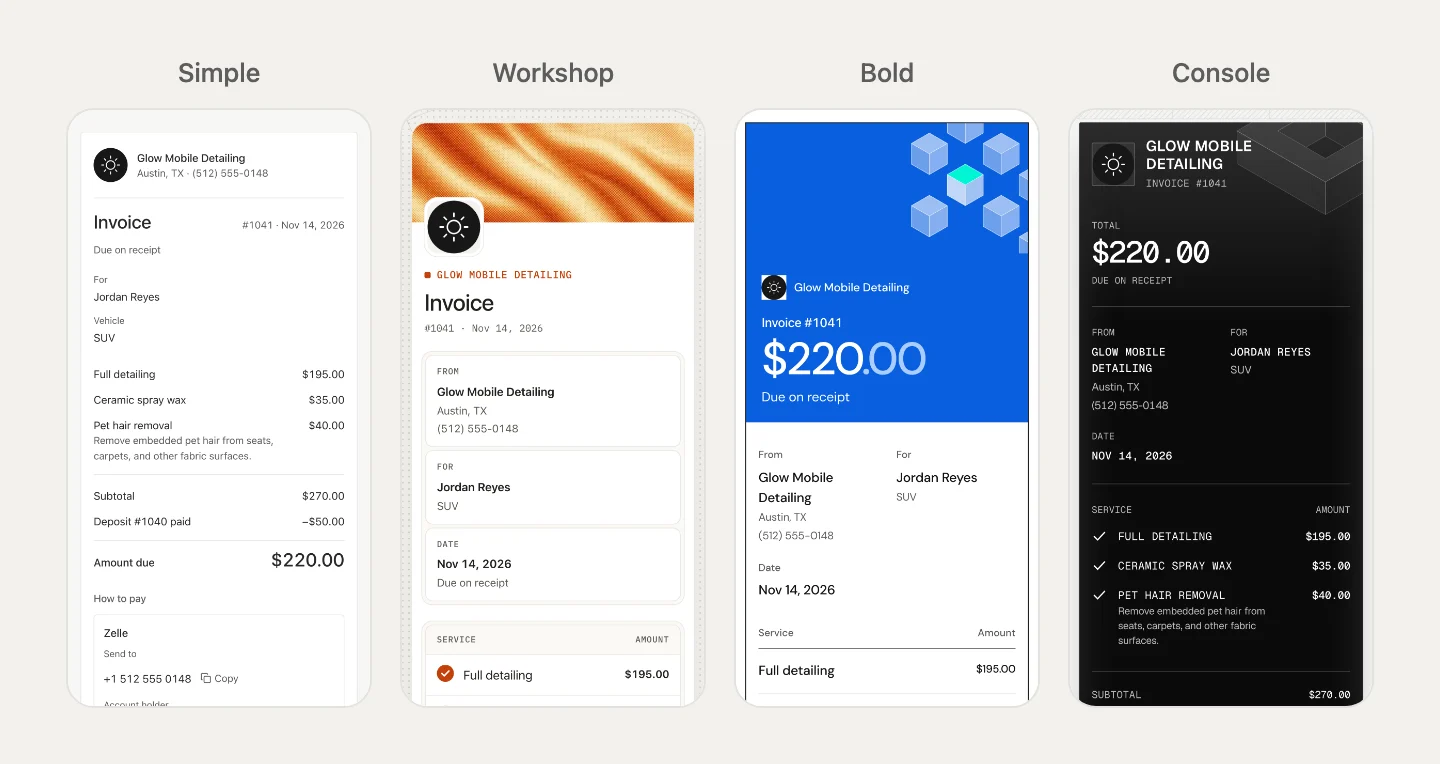
The invoice wears the same design as your booking page. You pick one of seven designs (Simple, Gallery, Workshop, Bold, Soft, Deep and Console) in Booking page → Theme on the web. Earnings and a CSV export of quotes and invoices help with your books.
We make TwoBucket, mobile detailing software with a booking page, quotes, invoices, card payments, scheduling, and more, for $20 a month with a 7-day free trial and no card required.
Questions
What is the difference between a quote and an invoice?
A quote is what you send before the work, so the customer can approve the price. An invoice is what you send after the work, so the customer can pay. Our quote guide, linked at the top of this page, covers how to write and send one.
Do I need invoice numbers?
We found no US federal rule that requires them in order (we checked the IRS’s record-keeping pages), and rules differ by country, so check yours. Giving every invoice a different number makes it easy to find one later and to match a payment to it. Numbering them in order is a common and practical habit.
Should I list each service separately or use one total?
One line per service. The customer sees what they are paying for, and you get fewer questions about the price. Condition extras like pet hair removal belong on their own line too.
Can a customer pay from the invoice on their phone?
Yes, if you include a card payment link or clear instructions for Zelle, Venmo, or another method. In TwoBucket, the invoice has a Pay button when you connect Stripe or Square, and saved payment methods show with Copy buttons the customer can use right from their phone.


