Jobber and TwoBucket allow a customer to request service from you online. So you will find them when searching for the same thing. They are not comparable to one another and if you are a detailer you will most likely know what you want after reading this.
Jobber will allow you to manage your field service business. Clients, quotes, jobs, team members, invoices and payments. Whether it’s a plumbing business, cleaning business, landscaping or detailing. TwoBucket will allow you to give your customer a place to select what services they want on their car and submit a request to you. From there you can send a quote, schedule the visit and send the invoice.
We created TwoBucket so know that we may be biased. We tried our best to explain where Jobber would be a better fit for you. Pricing and information below was pulled from Jobber’s pricing page and help center, as of October 2026.
Short answer
You should use Jobber if you have team members that you want to schedule with customers. Want customers to be able to book you on your calendar. Take deposits on your quotes.
You should use TwoBucket if you are a one man shop or have a couple of employees. Your customers come from Instagram or Google. And want to accept detailing requests, send out quotes and get paid.
| TwoBucket | Jobber | |
|---|---|---|
| Built for | Mobile detailers only | Field service businesses of many kinds |
| Price | $20/mo, or $191.64/yr ($15.97/mo) | Core, 1 user: $49/mo, $39/mo with a 1-year commitment, or $29/mo billed yearly |
| Free trial | 7 days, no card | 14 days, no card |
| Customers book a real time slot | No. They pick a preferred day and time window, and you confirm | Yes, on booking forms |
| Quotes and invoices | Yes, sent as a link | Yes |
| Card payments | Yes, for US businesses, into your own Stripe or Square account. No TwoBucket fee | Yes. Cards 2.9% + 30¢ |
| Deposits | No | Yes, on quotes |
| Scheduling visits | Yes, with reminders and calendar sync | Yes |
| Vehicle type or make, model, and year | Built in | Custom questions you add |
| Vehicle condition (pet hair, stains, odor…) | Built in | Custom questions you add |
| Team scheduling and routes | No. One login per business | Yes, more on higher plans |
Things Jobber offers that TwoBucket doesn’t
As stated Jobber offers more than TwoBucket does.
- Allows customers to book time with you. Jobber’s form allows you to let customers select an available time that works for your team. Or they can book an appointment to be assessed. With TwoBucket you can let them select a date and time that they want you to come. You would have to reach out to them to confirm the appointment.
- Jobber can take deposits. You can send a quote to your customer and they can approve and pay a deposit. Jobber takes card and ACH payments. TwoBucket lets your customer pay an invoice by card through your own Stripe or Square account, but it doesn’t take deposits.
- Jobber can schedule you and your team. On higher tier plans you will also have access to more scheduling options such as routing. Checklists and time tracking. You can even connect to your accounting program. TwoBucket only has one login for your business. You can schedule your visits, but not assign them to a team.
- Jobber offers add-ons. They offer add-ons that can help you with marketing and receiving reviews. You can even get a receptionist that will answer calls and texts for you. TwoBucket keeps a customer list from your requests, asks for reviews and reminds customers when their next detail is due. But it won’t answer calls for you.
If you feel like you would benefit from some of these features Jobber would be the way to go. Or you could find another program that offers similar services.
What TwoBucket does different
Since TwoBucket only focuses on mobile detailing we ask for the information you will need to send your customer a quote.
- Allows customers to select what vehicle they have. They can select a picture of their vehicle type or type in their make, model and year and we will give them options. Jobber can let you add custom questions to your form. So you can always add what vehicle your customer has.
- Allows customers to tell you what condition their vehicle is in. They can select if there is pet hair, stains, odor, sand, heavy dirt, mold, food and grease. Which can determine if your full detail will take you 3 hours or 6.
- You can list your prices. Each service that you add to your page can have a price listed. A fixed price, starting price, range or no price listed. If every service they pick has a price your customer can see their estimate before submitting.
- Services that you can use for your detailing business. When you create your page we will pre populate some of the most popular services. You can toggle on and off any service that you want to offer.
- TwoBucket will give you a page at bookr.page. Even if you don’t have a website you can put your TwoBucket page on your Instagram and Google Business Profile. If you do have a website you can embed your form on your website. Inline, as a pop up, as a floating button or as a link.
- Offer your customers different languages. You can have your page in 15 languages, including Spanish, French, Portuguese, Arabic, Chinese and Hindi.
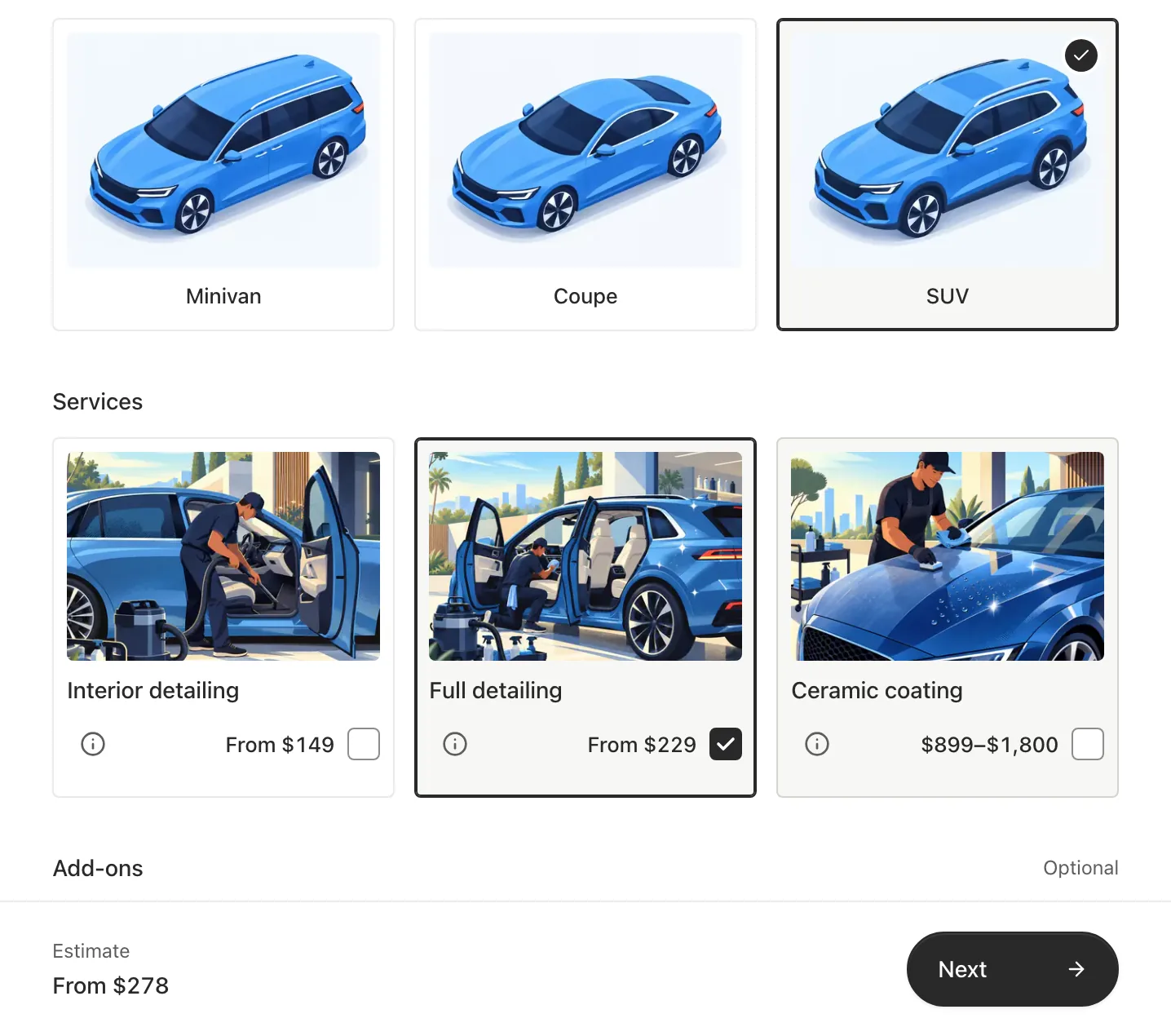
When someone sends you a request you will receive an email. If you’re located in the United States you can also enable text messages. You can open the request from that message without logging into TwoBucket. Call your customer or text them a quote. Schedule the visit and TwoBucket reminds your customer the day before. Once your job is complete you can send them an invoice. If you connect Stripe or Square they can pay it by card.
Price
Jobber offers their prices in 3 ways for each package. Core, which allows 1 user, is $49/mo with no contract. $39/mo if you commit to a year and $29/mo if you pay yearly. Their next plan is Connect which starts at $139/mo, and Grow at $199/mo if paying monthly. Additional users are $29/mo. Payment processing fees are 2.9% + 30 cents.
TwoBucket offers one price. $20/mo or you can pay yearly for $191.64 which comes out to $15.97/mo. TwoBucket doesn’t add a fee to card payments. Stripe or Square charge their usual processing fee. See pricing.
Both companies offer a free trial. Jobber’s trial is 14 days and TwoBucket’s trial is 7 days. Neither company requires you to add a credit card to start.
If you’re looking to spend less money TwoBucket is the cheaper option. But if you need the features Jobber offers then TwoBucket may not be the best fit for you.
Can I use both?
Yes you can. There is no integration between Jobber and TwoBucket at this time. You can download your TwoBucket customers as a CSV file. If you’re currently using Jobber and love their request form. Adding TwoBucket will give you one more place to look for requests.
Maybe you just started detailing and want to get your customers to request service from you. Then as your business grows you can transition to Jobber or another scheduling program.
Questions
Will Jobber work for my mobile detailing business?
Yes, Jobber markets itself to auto detailers too. You will have to create your services and form. But they do allow you to schedule your customers, send quotes and invoices.
Is TwoBucket a replacement for Jobber?
If you’re looking to accept customer requests, send quotes and invoices and schedule your own visits then yes. For scheduling a crew, booking time slots or taking deposits, no.
Which program takes less time to setup?
TwoBucket will ask you a few questions about your business. What your page URL will be, how you would like your customers to select their vehicle. And if you want to show prices on your page. We will also pre populate some services that are common to detailing. Jobber will require a little more time since they offer more.