 twobucket.

Most mobile detailers take card payments in one of two ways: a payment link on the invoice that the customer opens and pays on their own phone, or Tap to Pay (or a card reader) on the detailer’s phone at the car. Many detailers also keep Zelle, Venmo or cash as options, because some customers prefer them.
This guide covers both ways to take a card, what each one costs through Stripe and Square, how to get paid before you drive away, how tips and refunds work, and how to set up card payments in TwoBucket.
Two ways to take a card at the job
A payment link on the invoice
You send the customer an invoice by text or email. The invoice has a Pay button that opens a checkout page hosted by Stripe or Square. The customer enters their card details, or pays with Apple Pay or Google Pay, right on their own phone. No hardware on your end, no app on theirs.
This works whether you are standing next to the car or the customer pays later from their couch. It is the simplest setup because you only need a Stripe or Square account connected to your invoicing tool.
Tap to Pay or a card reader
The customer taps their card or phone on your phone, and the payment goes through. Tap to Pay on iPhone works on an iPhone XS or later with a supported payment app such as Stripe’s or Square’s. No extra terminal or hardware is needed. On Android, Square’s Tap to Pay needs Android 9 or later with NFC, and Stripe’s needs Android 13 or later.
For both Stripe and Square, in-person rates are lower than online rates, as the table below shows.
What it costs
The table below shows US standard rates as of November 2026. Rates change and differ by country, so check each provider’s pricing page before you decide.
| Online (link or invoice) | In person (tap or reader) | Money in your bank | |
|---|---|---|---|
| Stripe | 2.9% + 30¢ per US card charge. Cards typed by hand add 0.5%. International cards add 1.5%; currency conversion adds 1%. | 2.7% + 5¢ per US card, plus 10¢ per authorization. | First payout typically 7–14 days after the first live payment; then about 2 business days. Instant Payouts cost 1.5% (50¢ minimum), not available to new accounts right away. No setup or monthly fees. |
| Square | 3.3% + 30¢ on the free plan. Cards typed by hand: 3.5% + 15¢. | 2.6% + 15¢ per tap, dip or swipe on the free plan. | Payments taken before 5 PM Pacific arrive the next business day. Instant transfers cost 1.95%. No monthly fee on the free plan. |
Venmo business profiles charge 1.9% + 10¢ per payment received. Cash App for Business charges 2.6% + 15¢. PayPal invoices paid by card or Apple Pay cost 2.99% + 49¢, and those paid through PayPal or Venmo cost 3.49% + 49¢. Whether Zelle charges a business account depends on your bank.
TwoBucket adds no fee of its own on any payment.
Getting paid before you drive away
The simplest habit is to send the invoice while you are still at the car. If you send it while you finish the last panel, the customer can look at it and pay before you pack up. You avoid the follow-up text the next day, and the customer does not have to remember.
Itemize the invoice so every service and add-on is on its own line. When the customer sees exactly what they are paying for, there are fewer questions and fewer delays.
Tell the customer how you take payment when you confirm the booking. If they know ahead of time that you will send an invoice they can pay by card, Apple Pay, Google Pay, Zelle or cash, nobody is surprised at the car.
Processing fees are a cost of doing business. Some detailers build them into their prices rather than adding a surcharge, which keeps the checkout simple and the total predictable.
Tips, refunds and disputes
Square lets you switch tipping on for checkout links and invoices. When a customer adds a tip, Square charges its processing fee on the full total, including tax and tip.
Refunds for payments made through Stripe or Square are made inside Stripe or Square.
Disputes work differently between the two providers. Stripe charges $15 when a dispute is received, and that fee is not refunded. If you respond to the dispute, Stripe charges another $15, which is refunded if you win. Square does not charge a chargeback fee, but if you lose the dispute, the processing fee on the original transaction is not refunded.
Zelle, Venmo and cash still have a place
Not every customer wants to pay by card. Some would rather send money with Zelle, Venmo or Cash App, and some still pay cash.
You can list several payment methods on every invoice and let the customer choose. Zelle payments cannot be reversed, which Zelle notes on its own site — they say to send money only to people and businesses you trust. For you as the detailer, that means once a Zelle payment arrives, it stays.
Card payments in TwoBucket
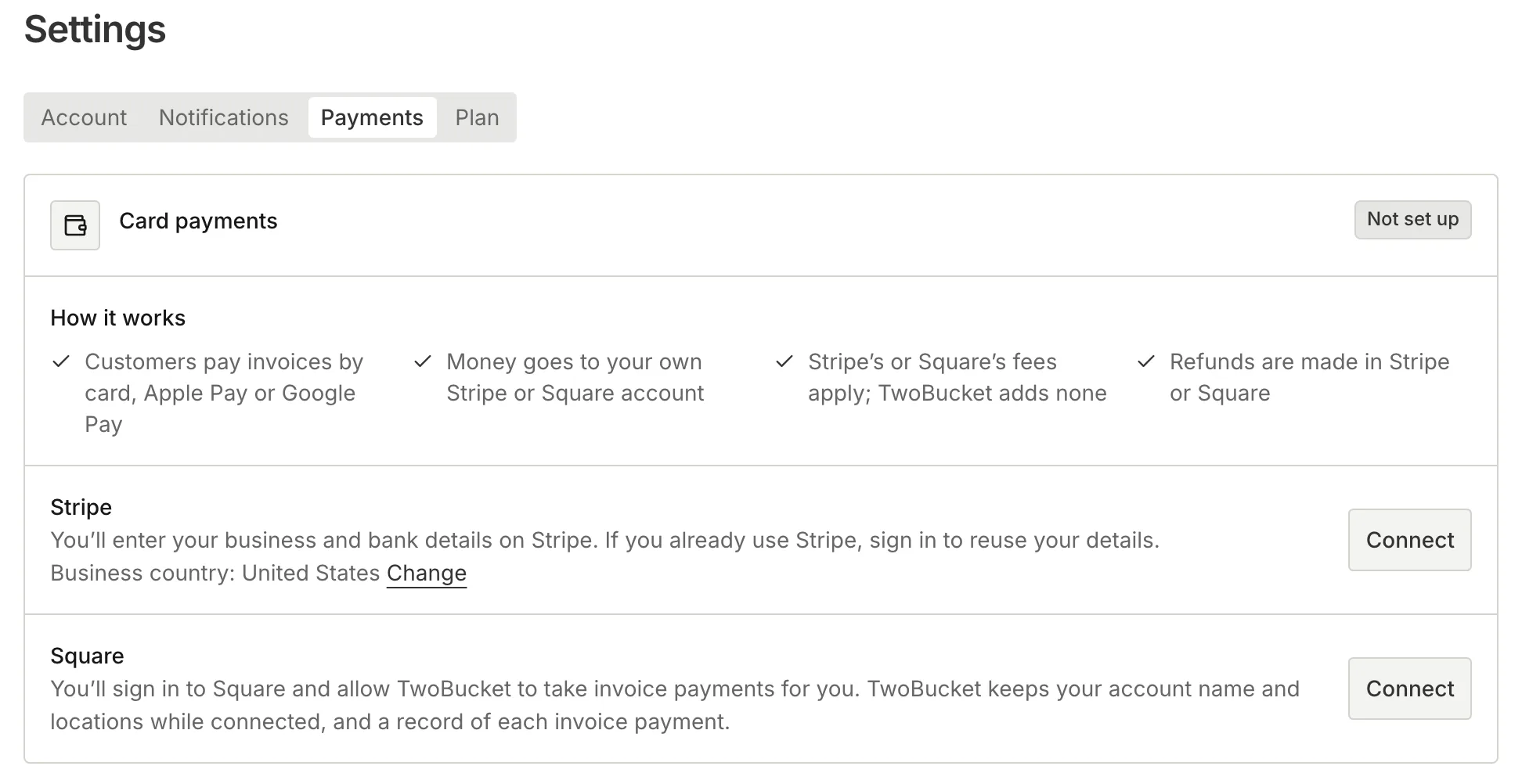
Connect your own Stripe or Square account once in Settings → Payments (or More → Payments in the app). Every invoice you send after that has a Pay button for the exact total. The customer pays by card, Apple Pay or Google Pay on a checkout page hosted by Stripe or Square. They do not need an app or an account.
The money goes to your own Stripe or Square account, and they pay it out to your bank on their schedule. TwoBucket adds no fee. When an invoice is paid, you get an email, and the invoice shows Paid to the customer. Refunds are made in Stripe or Square and appear on the invoice automatically.
Your invoices can also list Zelle, Venmo, a bank transfer and other ways to pay, each with a Copy button so the customer can grab your details in one tap. QR codes are included for SEPA bank transfers in euros, UPI in rupees and Pix in reais, with the amount filled in. You can mark any invoice paid by cash, card reader or anything else, and record a tip.
Card payments work in every country Stripe or Square serve, in the currency your account is paid out in. We make TwoBucket — it is mobile detailing software for solo detailers and small teams, and it costs $20 a month with a 7-day free trial and no card required.
Questions
Do I need a card reader for mobile detailing?
No. A payment link on the invoice lets customers pay by card, Apple Pay or Google Pay on their own phone, with no hardware on your side. If you prefer to take a card in person, Tap to Pay on iPhone (XS or later) or Android (9 or later with NFC) turns your phone into a terminal. A separate card reader is an option, not a requirement.
What percentage do I lose on each card payment?
It depends on the provider and whether the payment is online or in person. As a rough guide, expect between about 2.6% and 3.5% plus a small fixed amount per transaction. The exact rates for Stripe and Square are in the table above, and you should check each provider’s pricing page for current numbers.
Can I accept Apple Pay and Google Pay as a mobile detailer?
Yes. Both Stripe and Square support Apple Pay and Google Pay on their online checkout pages, so if a customer pays through the invoice link, those options are available. Apple Pay also works with Tap to Pay on iPhone for in-person payments.
Should I add a surcharge to cover processing fees?
That is a business decision. Some detailers build processing fees into their service prices so the total the customer sees is the total they pay, which keeps the invoice simple. If you would rather add a surcharge, check your payment provider’s rules and your state’s laws first.


